Introduction
Traefik is a reverse proxy that allows you to have all of your web services behind a single front end. It can be used for easy management of Docker based services (with automatic SSL certificate generation), and also to handle external services (located on another device/IP or hosted in Docker).
The main benefits (and the reasons that I am using Traefik) are:
- It is a container aware proxy. It will automatically pick up any changes to running Docker containers (configuration is made using labels on the target container)
- You can setup a wildcard DNS record for your subdomain (if you have one) to point to Traefik so that any new entries do not need to be added manually for each service (See my DNS server post for more information)
- Other non-Docker services can be manually added using a configuration file (rules.yaml/toml)
- It can used in Kubernetes, allowing for high availability hosting
Setup Overview
These are the requirements to establish the setup that I currently have for Traefik:
- DNS entries for sites (minimal can be editing the local Hosts file if you don't have a DNS server, but a provider is required if you want SSL certificates)
- Docker host to run Traefik and other containers
Traefik Dashboard
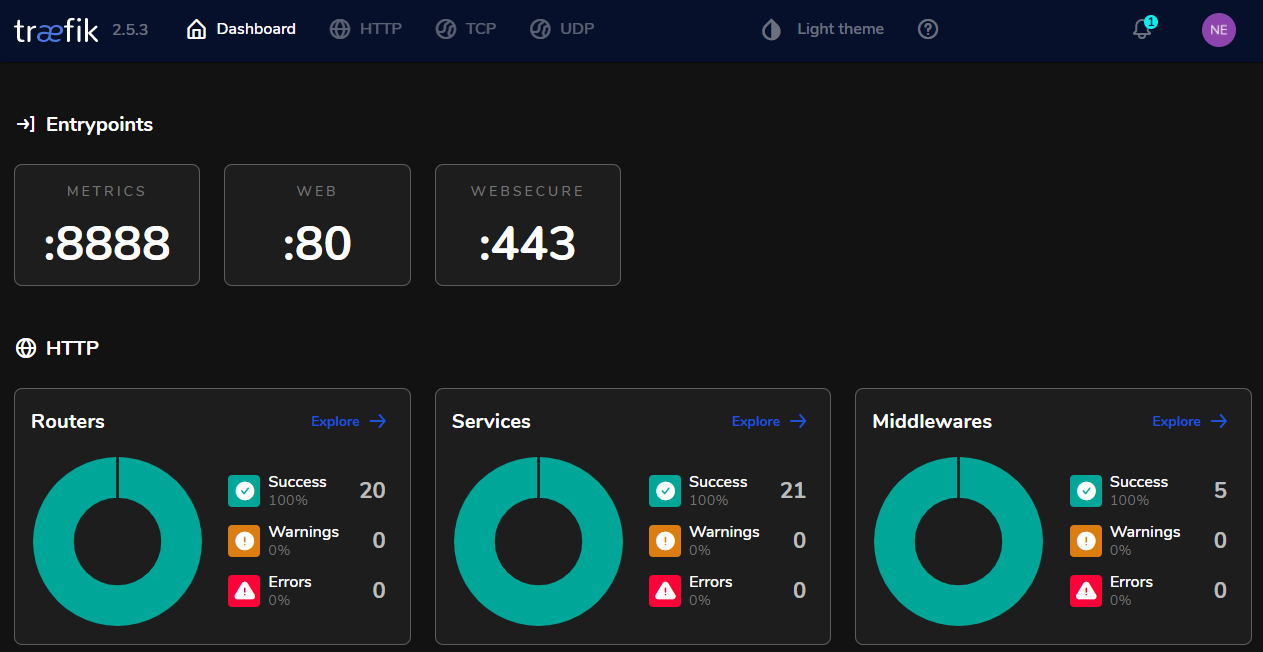
The dashboard for Traefik is the best way to check how all of the traffic and routing is working and for troubleshooting services or access The documentation for the dashboard can be found here
The main page of the dashboard will show useful information about the services and ports that it is listening on (example below listens on Port 80/443 for web and also 8888 for Metric information):
Adding Containers
When setting up a service to be proxied by Traefik, there are a few things to consider that can be illustrated by the below flow diagram:
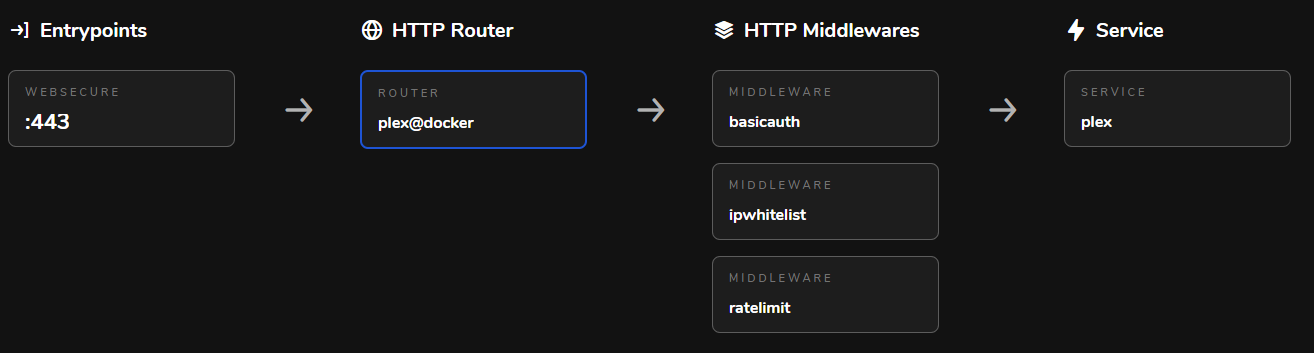
- Entrypoint: the port/protocol you want the service to listen on (usually 80/443)
- Router: in charge of connecting incoming requests to the services
- Middleware: any changes that need to made to the request/authentication
- Service: the container or service that this will be routed to (Docker container or manual entry)
Tags
Inside of the docker-compose.yml file for each container, I will specify the labels that are used to control the different requirements of how it will be handled by Traefik
Here is the docker-compose.yml for my Plex:
version: '3.3'
services:
  plex:
    image: linuxserver/plex
    container_name: plex
    ports:
      # Plex DLNA Server
      - 1900:1900/udp
      - 32410:32410/udp
      - 32412:32412/udp
      - 32413:32413/udp
      - 32414:32414/udp
    labels:
      - plex
      - "traefik.enable=true"
      - "traefik.http.routers.plex.rule=Host(`plex.domain`)"
      - "traefik.http.routers.plex.entrypoints=websecure"
      - "traefik.http.routers.plex.tls.certresolver=myresolver"
      - "traefik.http.services.plex.loadbalancer.server.port=32400"
      - "traefik.frontend.rule=Host:traefik.domain"
      - "traefik.http.routers.plex.middlewares=middlewares-rate-limit@file,middlewares-ipwhilelist@file"
    networks:
      - web
    environment:
      - PLEX_UID=1000
      - PLEX_GID=1000
      - UMASK=022 #optional
      - PLEX_CLAIM=claim-XXXXXXXXXXXXXXXXXX
    restart: unless-stopped
    volumes:
      - cifs-plex:/config
      - cifs-movies:/movies:ro
      - cifs-tv:/tv:ro

volumes:
  cifs-plex:
    external: true
  cifs-movies:
    external: true
  cifs-tv:
    external: true

networks:
  web:
    external: true
There are quite a few sections in here, but the main one I will be looking at is the "labels":
plex Used to label the container name for easy management)
traefik.enable=true Tell Traefik to watch this container
traefik.http.routers.plex.rule=Host('plex.domain') DNS hostname to use
traefik.http.routers.plex.entrypoints=websecure Use the "websecure" entrypoint (HTTPs port as seen in the Dashboard screenshot)
traefik.http.routers.plex.tls.certresolver=myresolver The certificate resolver to use, all of mine use the "certresolver" in the Traefik Docker command for Lets' Encrypt
traefik.http.services.plex.loadbalancer.server.port=32400 The port of the client if multiple or non-standard (Plex web uses 32400 and has multiple other ports available)
traefik.frontend.rule=Host:traefik.domain The name of the Traefik host, same on all sites
traefik.http.routers.plex.middlewares=middlewares-rate-limit@file,middlewares-ipwhilelist@file Middleware to be used, this one will limit requests and also only allow internal IP addresses to access the service (set in my rules.yaml file)
Also note above that this container has the router's specified as traefik.http.routers.plex.* while other containers will need their own name replacing plex to ensure that router's don't overlap
Non-standard port mappings
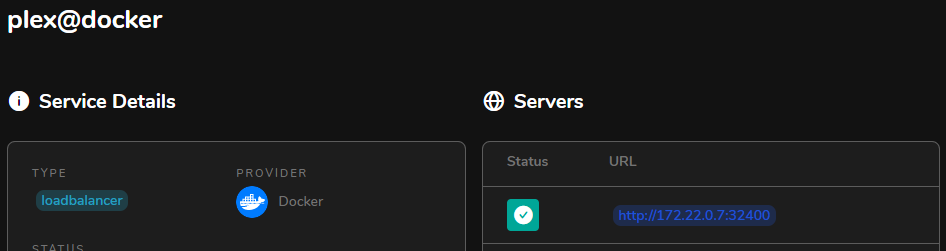
A note to make in the example above is that is a docker container listens on multiple ports (running a docker ps will show the ports that the container is listening on) or a non-standard web port then you will need to specify it in the traefik.http.services.NAME.loadbalancer.server.port label to allow Traefik to correctly point to it
Example here is checking the Service for Plex to ensure that it uses the correct port (32400)
Certificate Management
Once we have the services setup correctly, we would like a valid certificate to appear in the title bar to ensure extra security is applied to the site. For each of the services that you want to have a certificate generated for, you will specify in the labels which certificate resolver to use For Traefik I use the "myresolver" as the name, and pass the parameters to the Traefik docker-compose.yml (full config file can be seen at the bottom of this page)
services:
  traefik:
    labels:
      - "--certificatesresolvers.myresolver.acme.dnschallenge=true"
      - "--certificatesresolvers.myresolver.acme.dnschallenge.provider=dreamhost"
      - "--certificatesresolvers.myresolver.acme.email=email@domain.com"
      - "--certificatesresolvers.myresolver.acme.storage=/letsencrypt/acme.json"
    environment:
      - "DREAMHOST_API_KEY=XXXXXXXXXXXX"
Once Traefik is aware of the certificate resolver to use, you can simply add the traefik.http.routers.plex.tls.certresolver=myresolverlabel to the container as in the Plex example above and it should place the certificate in the letsencrypt/acme.json file automatically
Extra Security (ssllab test)
Once you have the certificates applied correctly to the connected containers, you can look into adding extra security to the TLS connections used. A good site to test with (if your domains are publicly resolvable) is SSL Labs
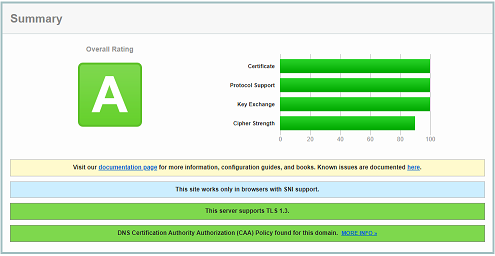
With the following configuration I am currently receiving an "A" score for SSL (as of 29th March 2022)
 Traefik docker-compose.yml:
labels:
      - "traefik.http.middlewares.traefik-headers.headers.accesscontrolallowmethods=GET, OPTIONS, PUT"
      - "traefik.http.middlewares.traefik-headers.headers.accesscontrolalloworiginlist=https://abowden.net"
      - "traefik.http.middlewares.traefik-headers.headers.accesscontrolmaxage=100"
      - "traefik.http.middlewares.traefik-headers.headers.addvaryheader=true"
      - "traefik.http.middlewares.traefik-headers.headers.allowedhosts=traefik.domain"
      - "traefik.http.middlewares.traefik-headers.headers.hostsproxyheaders=X-Forwarded-Host"
      - "traefik.http.middlewares.traefik-headers.headers.sslredirect=true"
      - "traefik.http.middlewares.traefik-headers.headers.sslhost=traefik.domain"
      - "traefik.http.middlewares.traefik-headers.headers.sslforcehost=true"
      - "traefik.http.middlewares.traefik-headers.headers.sslproxyheaders.X-Forwarded-Proto=https"
      - "traefik.http.middlewares.traefik-headers.headers.stsseconds=63072000"
      - "traefik.http.middlewares.traefik-headers.headers.stsincludesubdomains=true"
      - "traefik.http.middlewares.traefik-headers.headers.stspreload=true"
      - "traefik.http.middlewares.traefik-headers.headers.forcestsheader=true"
      - "traefik.http.middlewares.traefik-headers.headers.framedeny=true"
      - "traefik.http.middlewares.traefik-headers.headers.contenttypenosniff=true"
      - "traefik.http.middlewares.traefik-headers.headers.browserxssfilter=true"
      - "traefik.http.middlewares.traefik-headers.headers.referrerpolicy=same-origin"
      - "traefik.http.middlewares.traefik-headers.headers.featurepolicy=camera 'none'; geolocation 'none'; microphone 'none'; payment 'none'; usb 'none'; vr 'none';"
      - "traefik.http.middlewares.traefik-headers.headers.customresponseheaders.X-Robots-Tag=none,noarchive,nosnippet,notranslate,noimageindex,"
Traefik rules.yaml:
tls:
  options:
    default:
      minVersion: VersionTLS12
      cipherSuites:
        - TLS_ECDHE_RSA_WITH_AES_256_GCM_SHA384   # TLS 1.2
        - TLS_ECDHE_RSA_WITH_CHACHA20_POLY1305    # TLS 1.2
        - TLS_AES_256_GCM_SHA384                  # TLS 1.3
        - TLS_CHACHA20_POLY1305_SHA256            # TLS 1.3
      curvePreferences:
        - CurveP521
        - CurveP384
      sniStrict: true
Full copies of the config files are available at the bottom of this page
Middleware
Middleware is used in the middle of the request process, to make a change or add extra controls to the request as it is passing through
In my case I am using the following middlewares to add extra security:
- redirect-web-to-websecure (redirect HTTP to HTTPS)
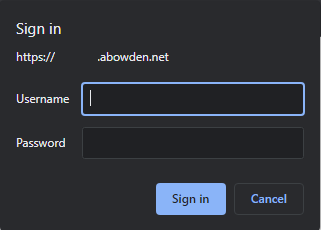
- middlewares-basic-auth (Adds a basic authentication prompt for username/password)
- middlewares-rate-limit (adds request rate limiting to slow down brute force attempts)
- middlewares-ipwhitelist (whitelist to only allow internal IP addresses to access internal services)
- traefik-headers (default headers to add for extra SSL security)
Docker-compose.yml file
version: "3.3"

networks:
  web:
    external: true

services:
  traefik:
    image: "traefik:v2.5.3"
    container_name: "traefik"
    restart: unless-stopped
    command:
      - "--api=true"
      - "--providers.docker=true"
      # Do not expose containers unless explicitly told so
      - "--providers.docker.exposedbydefault=false"
      - "--providers.file=true"
      - "--providers.file.filename=/etc/traefik/rules.yaml"
      - "--entrypoints.web.address=:80"
      - "--entrypoints.web.http.redirections.entryPoint.to=websecure"
      - "--entrypoints.web.http.redirections.entryPoint.scheme=https"
      - "--entrypoints.web.http.redirections.entrypoint.permanent=true"
      - "--entrypoints.websecure.address=:443"
      - "--entrypoints.websecure.http.middlewares=middlewares-basic-auth@file"
      - "--entrypoints.metrics.address=:8888"
      - "--metrics.prometheus=true"
      - "--metrics.prometheus.entryPoint=metrics"
      - "--certificatesresolvers.myresolver.acme.dnschallenge=true"
      - "--certificatesresolvers.myresolver.acme.dnschallenge.provider=dreamhost"
      - "--certificatesresolvers.myresolver.acme.email=email@domain.com"
      - "--certificatesresolvers.myresolver.acme.storage=/letsencrypt/acme.json"
      - "--serverstransport.insecureskipverify=true"
      - "--accessLog.filePath=/logs/access.log"
    security_opt:
      - "no-new-privileges:true"
    labels:
      - "traefik=name"
      - "traefik.enable=true"
      # Middleware
      - "traefik.http.routers.traefik-rtr.middlewares=traefik-headers,middlewares-rate-limit@file,middlewares-basic-auth@file"
      - "traefik.http.middlewares.traefik-headers.headers.accesscontrolallowmethods=GET, OPTIONS, PUT"
      - "traefik.http.middlewares.traefik-headers.headers.accesscontrolalloworiginlist=https://abowden.net"
      - "traefik.http.middlewares.traefik-headers.headers.accesscontrolmaxage=100"
      - "traefik.http.middlewares.traefik-headers.headers.addvaryheader=true"
      - "traefik.http.middlewares.traefik-headers.headers.allowedhosts=traefik.domain"
      - "traefik.http.middlewares.traefik-headers.headers.hostsproxyheaders=X-Forwarded-Host"
      - "traefik.http.middlewares.traefik-headers.headers.sslredirect=true"
      - "traefik.http.middlewares.traefik-headers.headers.sslhost=traefik.domain"
      - "traefik.http.middlewares.traefik-headers.headers.sslforcehost=true"
      - "traefik.http.middlewares.traefik-headers.headers.sslproxyheaders.X-Forwarded-Proto=https"
      - "traefik.http.middlewares.traefik-headers.headers.stsseconds=63072000"
      - "traefik.http.middlewares.traefik-headers.headers.stsincludesubdomains=true"
      - "traefik.http.middlewares.traefik-headers.headers.stspreload=true"
      - "traefik.http.middlewares.traefik-headers.headers.forcestsheader=true"
      - "traefik.http.middlewares.traefik-headers.headers.framedeny=true"
      - "traefik.http.middlewares.traefik-headers.headers.contenttypenosniff=true"
      - "traefik.http.middlewares.traefik-headers.headers.browserxssfilter=true"
      - "traefik.http.middlewares.traefik-headers.headers.referrerpolicy=same-origin"
      - "traefik.http.middlewares.traefik-headers.headers.featurepolicy=camera 'none'; geolocation 'none'; microphone 'none'; payment 'none'; usb 'none'; vr 'none';"
      - "traefik.http.middlewares.traefik-headers.headers.customresponseheaders.X-Robots-Tag=none,noarchive,nosnippet,notranslate,noimageindex,"
    ports:
      - "80:80"
      - "443:443"
      # Metrics
      - "8888:8888"
    networks:
      - web
    environment:
      - "DREAMHOST_API_KEY=XXXXXXXXXXXX"
    volumes:
      - "./letsencrypt:/letsencrypt"
      - "/var/run/docker.sock:/var/run/docker.sock:ro"
      - "./rules.yaml:/etc/traefik/rules.yaml:ro"
      - "./logs:/logs"
Rules.yaml file
http:
  routers:
    router-traefik:
      entryPoints:
        - websecure
      rule: Host(`dashboard.domain`)
      service: api@internal
      middlewares:
        - "middlewares-rate-limit@file"
        - "middlewares-basic-auth@file"
        - "middlewares-ipwhilelist@file"
      tls:
        certResolver: myresolver
  middlewares:
    middlewares-basic-auth:
      basicAuth:
        users:
          - "username:(encrypted password)"
        headerField: X-WebAuth-User
    middlewares-rate-limit:
      rateLimit:
        average: 100
        period: 1m
        burst: 100
    middlewares-ipwhilelist:
      ipWhiteList:
        sourceRange:
          - "127.0.0.1/32"
          - "192.168.0.0/24"
tls:
  options:
    default:
      minVersion: VersionTLS12
      cipherSuites:
        - TLS_ECDHE_RSA_WITH_AES_256_GCM_SHA384   # TLS 1.2
        - TLS_ECDHE_RSA_WITH_CHACHA20_POLY1305    # TLS 1.2
        - TLS_AES_256_GCM_SHA384                  # TLS 1.3
        - TLS_CHACHA20_POLY1305_SHA256            # TLS 1.3
      curvePreferences:
        - CurveP521
        - CurveP384
      sniStrict: true
Troubleshooting Steps
It's taken me quite a while to get to this setup with Traefik, and I've tried to boil down the troubleshooting steps to following the items in the "Setup Overview" section. This is the order that I will troubleshoot a container if it's not resolving the way that I planned:
- Check the Traefik Dashboard to make sure that the Router appears in the HTTP Routers section
- Click into the router to see the data flow at the top of the page
- Ensure that it is on the correct Entrypoint
- Ensure that the Router is container@docker (unless manually added service)
- Go to the linked HTTP service, double check the URL and port number resolve correctly (can do a wget from the Docker host to check the HTTP result returned from the internal Docker IP)
- Check the labels that are set on the container against other images (example is Plex)
- If all else fails, check the logs of the Traefik Docker container
Final Thoughts
This is still a work in progress, and extra labels and configuration are being added as I discover them or through extra security requirements
There are still some improvements that I'd like to make to the setup:
- Use Docker secrets to store the DREAMHOST_API_KEY
- Test out a High Availability setup (either 2 standalone instances, or with Kubernetes)
- Adding better error pages and monitoring (currently a generic 404 page will be shown if a host name is not available)
About the author
I'm currently an IT Deployment Manager with the focus on manufacturing software development. I also runs a homelab for personal/training purposes and to test out new technologies
Comments
Join the discussionNo comments yet. Be the first to comment.